
Scheduling
One diary for the office and the vans.
Book a visit, assign a driver, and recurring treatments come back on the calendar when the last one is done — no rebuilding next week by hand.
Schedule
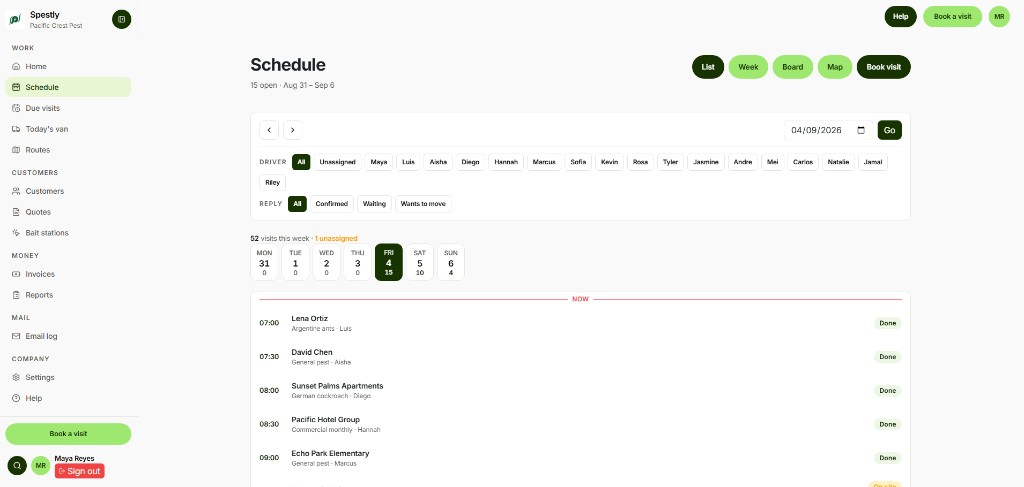
One week, every technician
If the office calendar and the van list are different files, a moved stop does not reach the driver.
Office staff and drivers see the same schedule. Change a time once and the phone list updates. Nothing is double-booked on the same technician.
Why pest scheduling is different
Most of the calendar is not a one-off call. It is a route of properties that come back every 30, 60, or 90 days. If the next date lives only in a spreadsheet, someone has to rebuild the week. That is when a quarterly account goes quiet until they call someone else.
Pest-control scheduling software keeps the frequency on the customer or property. Complete the visit and the next one is booked. Due visits show what is coming due even if nobody put it on this week’s run yet.
How a week works in Spestly
The office opens the diary, books a time, and assigns a technician — or leaves it unassigned and picks it up from Home. Website bookings land the same way: on the diary, unassigned, waiting for a name.
Drivers on Route or Fleet open Today and see their jobs in order. They do not get a second calendar. If you change a stop in the office, the phone list updates. Routes can order the day’s stops from your depot address and hand each one to Google Maps. That is a day list, not live traffic routing.
Snooze, skip, or move a visit when the customer is not home. The history stays on the property so the next technician is not guessing.
What it does not do
It will not replace a sat-nav or optimize around current traffic. For one to a few vans, an ordered list plus Maps is what most offices actually use. If you need turn-by-turn for twenty trucks, you want a different product.
FAQ
Questions owners ask
Related: Pest-control software · Mobile app · Pricing
Guides: Recurring treatments without a spreadsheet · Why visits get missed
Yes — assign at booking or later. Unassigned visits are flagged on Home so nothing slips.
Online bookings land on the diary unassigned, ready for you to assign a technician.
No — Routes is an ordered day list that opens in Google Maps, not a live sat-nav. For 1–3 vans that is usually enough.
Start a free 7-day trial
A card is required. You are not charged until day 8 if you stay.